Q : How to configure secureftp client to connect to RaidenFTPD via SSL?

A : First of all make sure your RaidenFTPD is newer than v2.2 build 800+ , and your RaidenFTPD/SSL is activated (only available in commercial license versions) , and now please start the enabled FTP client
Supposing Your Server IP + PORT (explicit SSL enabled) is 90.0.0.1 PORT 1081 , if you want to use explicit SSL , you need to make sure your RaidenFTPD is newer than v2.4 build 306
Step 1: Fire up your Igloo FTP Pro 3.7+
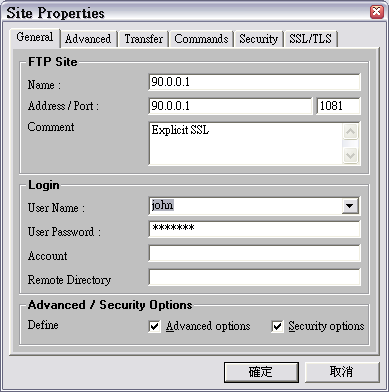
Click on the site manager , create a new site profile and enter the correct address , port , username , user password , and the check the 2 check boxes advanced options and security options so more option tabs will appear
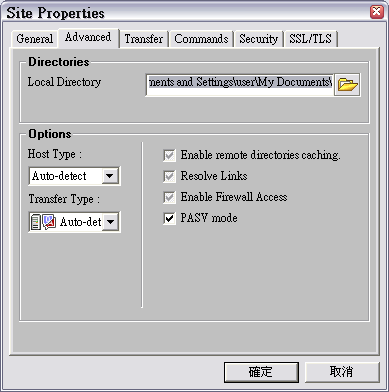
Once you are done , click the advanced tab , and make a solid check for PASV check box
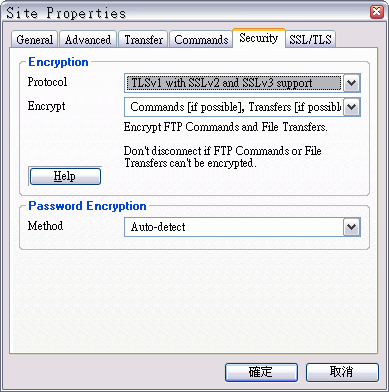
And then click on the security tab , set the protocol to TLSv1 with SSLv2 and SSLv3 support , and Encrypt Commands , Transfers
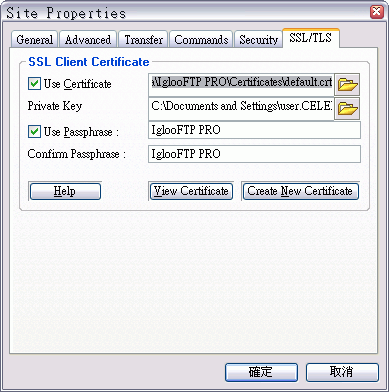
And then click on the SSL/TLS tab , click on the use certificate check box
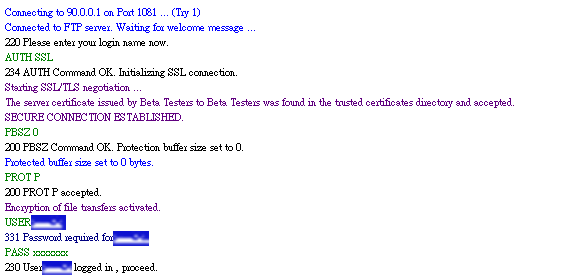
Step 2: Now use Igloo FTP Pro to connect to the RaidenFTPD/SSL
When you are connecting , you will see SSL negotiation messages in the log window
That's ALL